Free security tools
Password Strength Checker and Generator
Our password strength checker tests the shape of a password, builds strong new ones in a click, and checks if your accounts are ready for passkeys. It is free, and you never type a password you actually use.
Free to use. You never type a password you actually use.
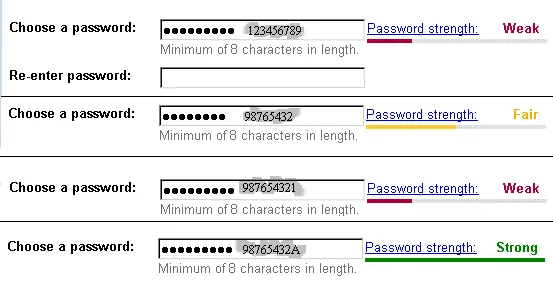
Photo by Gryllida at en.wikipedia on Wikimedia Commons (Public domain)

Generate a strong password
Create strong passwords for home, office or IT
Make a different, hard-to-guess password for each account. The generator builds one in a click, so you never reuse the same password across sites.
At home
Make a strong, unique password for each personal account, then save it in a password manager so you do not have to remember them all.
In the office
Give staff a quick, consistent way to create strong passwords, instead of a shared formula everyone can guess.
For IT departments
Generate passwords that meet your length and character rules when setting up or resetting accounts across the team.
Free to use. You never type a password you actually use.
Three tools for a stronger sign-in
Each tool does one job in plain words. Use them in any order, with no account needed.
- Password strength checker: See how strong a password pattern is. It scores the shape, length and variety, and shows what would make it harder to guess. You type a made-up pattern to test, never a password you use.
- Password generator: Create a long, random password in one click. Pick the length and character types, then copy it straight into your password manager.
- Passkey readiness check: Find out if your device and browser can use passkeys, the sign-in method that replaces passwords with your phone or computer.
More free tools and checks
Passwords are one part of staying safe. These pages cover the rest.
Free security and privacy tools
Every free tool in one place, grouped by what you need to check.
Free data breach check
Enter an email address and see which publicly known breaches it appears in.
Check a scam text, email or link
Judge a suspicious message, link or QR code before you act on it.
Email security check for your domain
Check a domain's email security grade and read its mail headers.
Steps to a stronger sign-in
Work through these in order. The first steps protect the most, so start at the top.
Make each password long and unique
Aim for long passwords that you use on only one account. Length matters more than odd symbols. A reused password means one breach can open many of your accounts.
Use a password manager to remember them
A password manager remembers a different password for every account, so you only need one strong passphrase. Use our generator to fill it with random passwords.
Turn on multi-factor sign-in
Add a second step to your most important accounts, starting with your email. Even if a password leaks, the extra step blocks most sign-in attempts.
Switch to passkeys where you can
Where a site offers passkeys, turn them on. A passkey cannot be phished or reused, because it stays on your device. Run the passkey readiness check first.
Check your email for breaches
See if any of your accounts show up in publicly known breaches. If a password was exposed, change it everywhere you used it.
Questions about the password tools
Frequently Asked Questions
- Is the password strength checker safe to use?
- Yes, because it tests a made-up pattern, not a password you use. It estimates strength from the shape, length and common patterns. We ask you to type a sample pattern, never a real password, and no site should ever ask for a password you use elsewhere.
- Do you store what I type into the tools?
- The password tools are for checking patterns and creating new passwords, not for saving them. Do not enter a password you use. If you want to see how we handle data on the site, read How We Handle Your Data.
- What makes a password strong?
- Length first, then variety, then not reusing it. A long passphrase of several random words is strong and easier to remember than a short jumble of symbols. Avoid names, dates, and anything someone could guess or look up about you.
- Are generated passwords safe to use?
- A random password from the generator is hard to guess, which is the point. Save it in a password manager rather than trying to remember it, and use a different one for every account.
- What is a passkey and should I switch?
- A passkey is a secure key stored on your phone or computer that you unlock with your fingerprint, face or device PIN. It cannot be phished or reused. If the passkey readiness check shows your device is ready and a site offers passkeys, turning them on is a strong step.
- Is this really free, and how does the site make money?
- Everything on the site is free to use. Some outbound links to other companies are affiliate links, which means we may earn a commission if you buy through them. We always disclose this, and it never changes what you pay.
Try the password tools now
Check a pattern, create a strong password, or see if you are ready for passkeys.
Free to use.